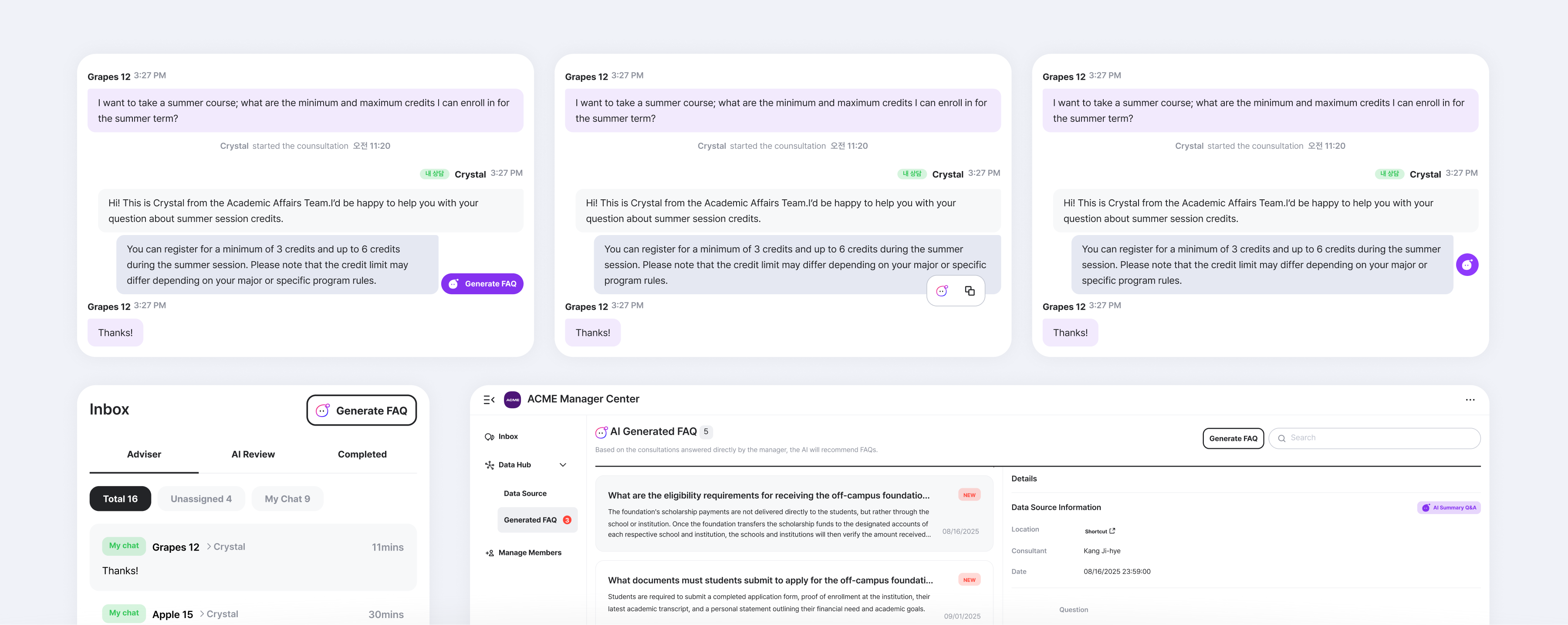
Connect is an AI-powered academic support service used by universities to
handle repetitive institutional inquiries. While the chatbot could automatically
respond to many questions, unfamiliar or complex cases still required human
intervention.
This project focused on what happens after those human responses—and how the system
should (or should not) learn from them.
Recorded the latest production version
Context
When Connect failed to answer an inquiry, administrators stepped in to
respond manually. These successful human responses were valuable: they represented
new knowledge that could help the AI perform better in the future.
The initial assumption was straightforward—if the system could
automatically log these responses and add them to the knowledge base, it
would reduce repeated work and improve accuracy over time.
Early engagement metrics supported this idea. Administrators reviewed the generated
logs with interest, and the feature appeared efficient.
Problem
Over time, real usage revealed an issue.
Although the automated logs were comprehensive, they were reviewed outside the
context in which the original conversations happened. This made authorization
harder, not easier. Important nuances were lost, and administrators felt they were
being asked to approve decisions after the fact—rather than make them when the value
of the information was most clear.
What was intended as frictionless automation introduced a different kind of friction
later in the workflow.
More importantly, administrators expressed discomfort with the system deciding what
should be learned automatically. In professional environments, authority and
accountability matter. Users wanted control over what became institutional
knowledge.
Design Focus
This project examined how AI systems should grow through human input without
skipping human authority, and context.
Rather than asking how much the system could automate, the question became: When should people be involved, and how should AI support that decision?
Design Shift
From Background Automation to In-Context Collaboration
The design moved away from automatic inclusion and batch review. Instead, the system
was redesigned to support user-initiated contribution:
Drafts and Ideas
Decision #1
Move the “Trigger” Inside the Conversation View
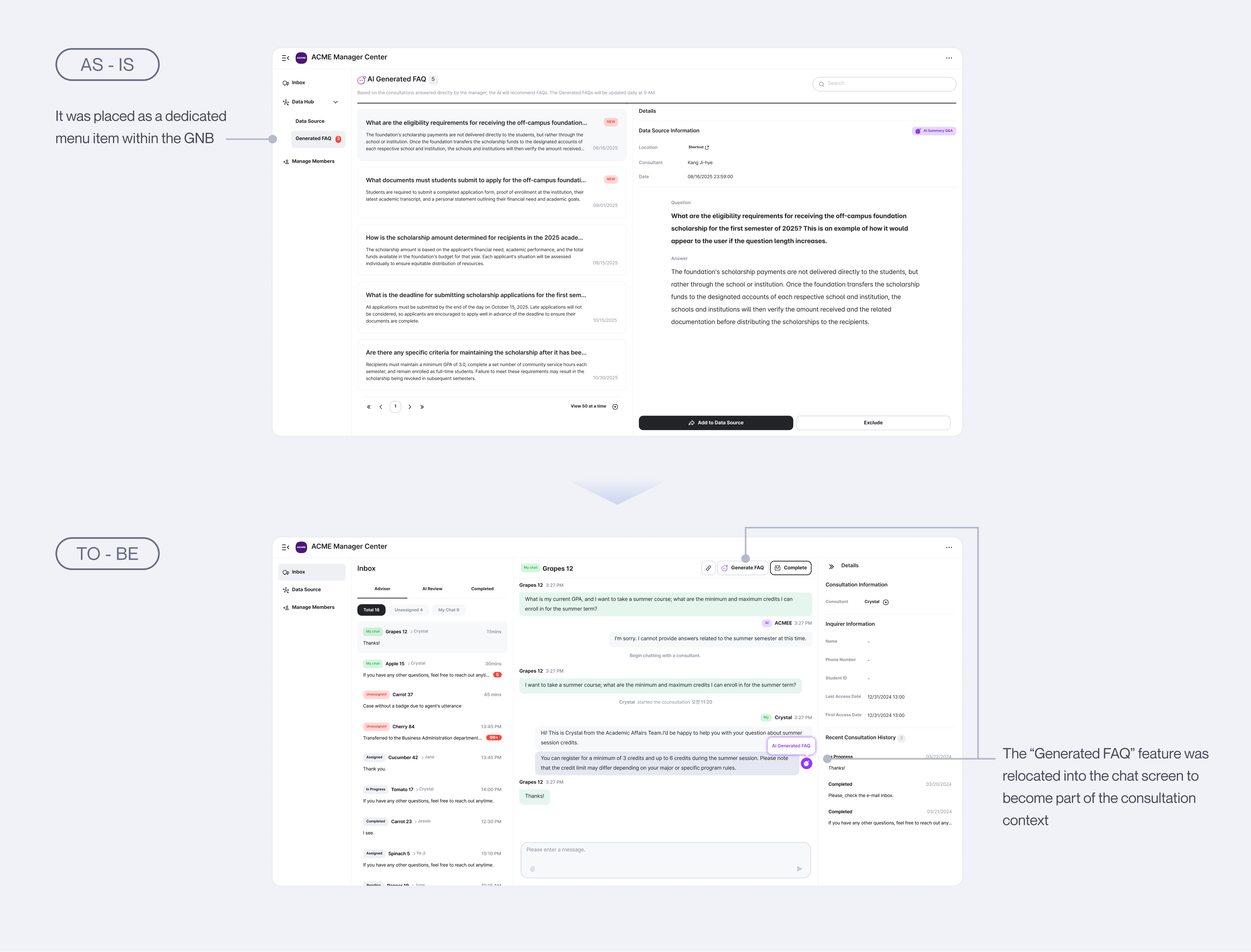
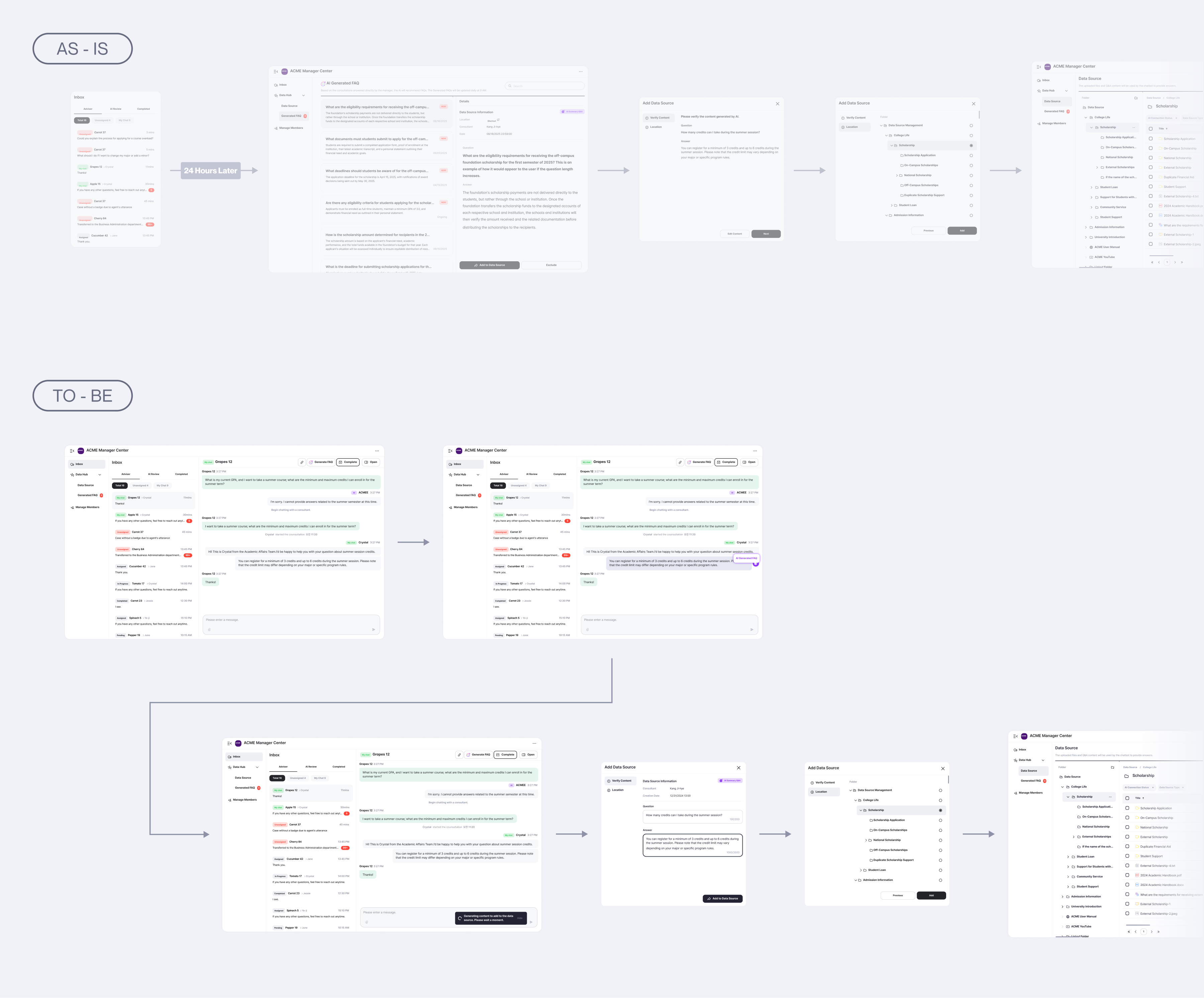
In the initial version, the “Generated FAQ” button lived in a separate menu that
scanned all conversations once every 24 hours to propose new entries. Through
observation, I realized that users often thought “this is useful information to
add” in the middle of a chat, not later. Placing the trigger directly inside the
conversation window aligned the system with this moment of attention.
This change had two effects. It allowed users to act instantly within their
existing workflow instead of switching tabs or waiting for AI recommendations. It
narrowed the scope of data the AI had to read, reducing token cost and latency. In
practice, the feature became not a distant automation, but a real-time companion
that supported users at the very moment of decision.
As-is and To-be locations of Generated FAQ
Decision #2
Support Both Single-Message and Full-Context Generation
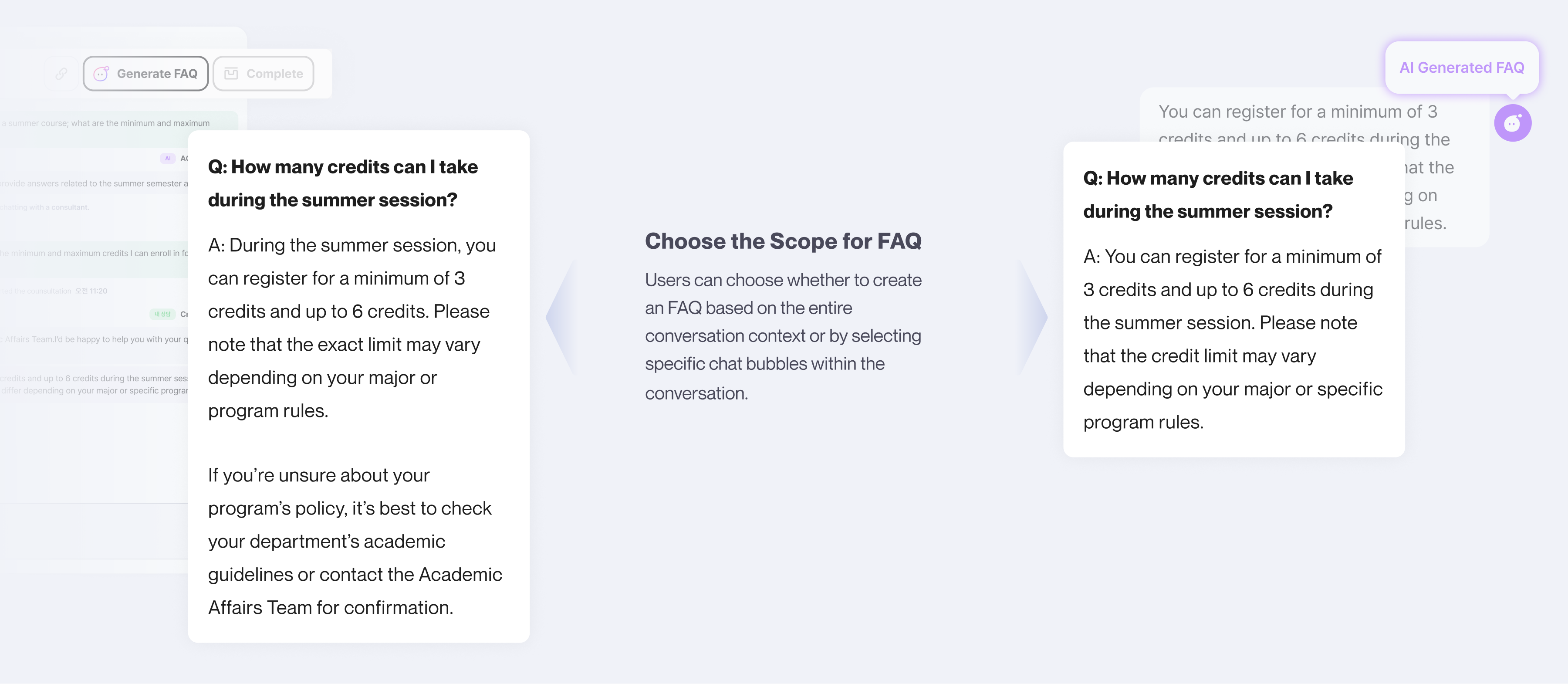
Early prototypes generated FAQs from all conversations, when various questions
were exchanged, the resulting output contained a mix of diverse topics. To balance
precision and completeness, I introduced an option to select the generation
scope—either one message or the full conversation.
This approach gave users agency: they could choose the appropriate context
depending on what data they want to add. It also improved the AI’s precision,
since a smaller scope required fewer tokens and minimized creating parts without
intention, while larger scopes able to capture the overall context in its summary.
Summarizing the entire conversation vs. a selected part
Decision #3
Enable Inline Editing After Generation
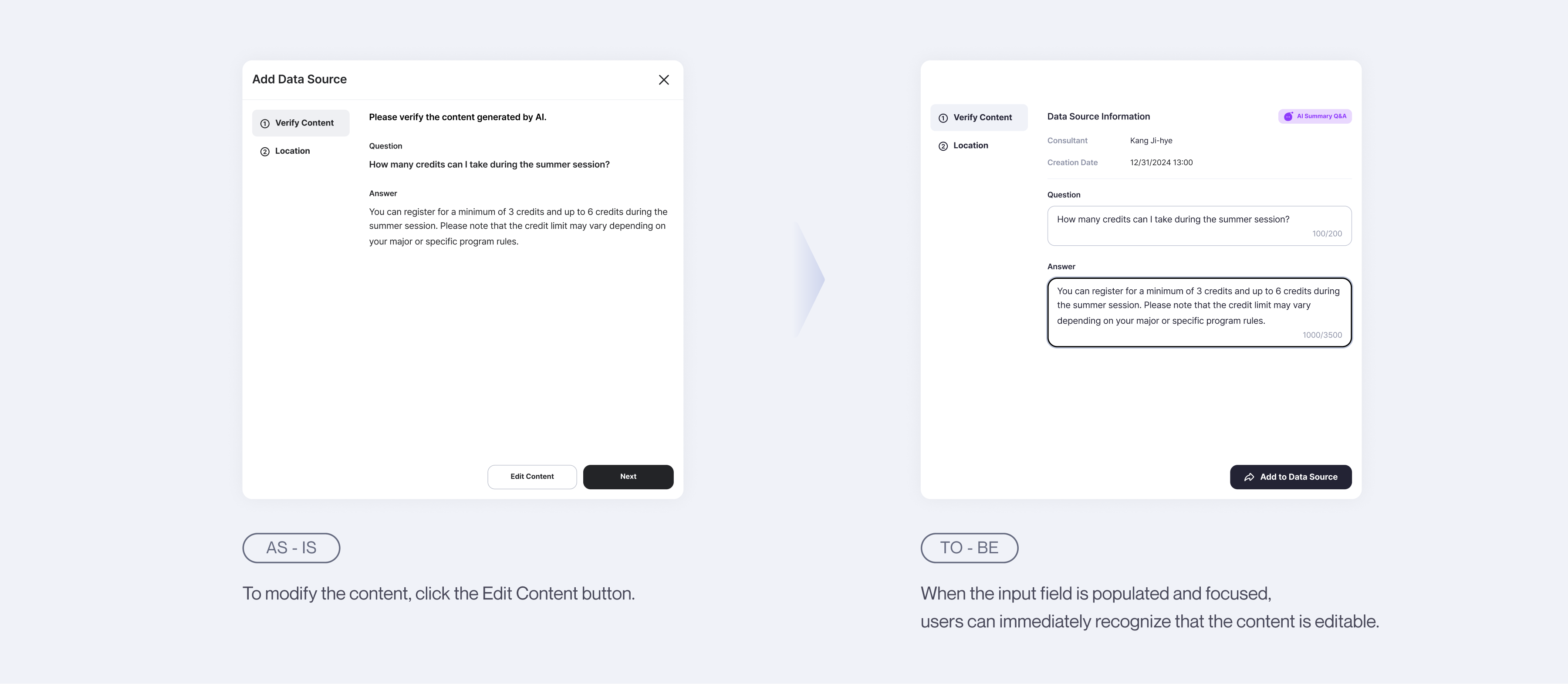
During interviews, every user mentioned they would never save AI-generated content
without editing. Users carefully refined tone, terminology, and facts—rather than
saving AI’s output as is. In response, I designed an inline editing flow that
appears right after generation. Users can now review, modify, and save the Q&A
in a single flow, staying anchored in the same page.
This design provided an affordance that allows users to directly edit AI outputs.
It minimized hallucinations, shortened the “time-to-save,” and helped users
internalize the AI’s suggestions as part of their own authorship.
Editing and Saving the Generated FAQ
This more passive approach—where the system waited for human judgment rather than
prompting it—proved more effective. It reduced overall interaction time while
increasing trust and satisfaction.
Outcome
Interaction Flow
Final work flow for this project
User clicks “Generate FAQ” inside the conversation bubble or header. AI generates
Q&A → user reviews and edits immediately. FAQ is saved to the Data Center with a
source link to its originating chat.
Impact
Small Change, Measurable Impact
Weekly usage increased from average 0.5 times per week to 7 times per week, then
stabilized at 2 times per week as AI performance improved.
Administrators felt more confident managing the knowledge base
Contributions became more deliberate and accurate
The system improved without creating additional review burden
The change revealed that full automation was not the right goal. Supporting judgment
at the right moment mattered more than eliminating steps.
+ 4x
Weekly Usage*
“Now I can save FAQs right when I notice something important — it’s so much
smoother.”
Academic Affairs Staff, University of Ulsan
“It felt like the team really observed how we work and reflected that in the
product.”
Supervisor of Academic Affairs, University of Ulsan**
*Trigger click rate and completion rate for 1 month before and after of release.
**Feedback provided by customers via CSM since the release.
Thoughts & Reflection
This project challenged my assumption that increased automation naturally leads to
better systems.
I learned that in professional contexts, people want AI to assist—not decide—for
them. Designing AI to be opt-in, contextual, and respectful of human authority
resulted in better adoption than attempting to automate learning entirely.
It reshaped how I think about human–AI interaction: not as a problem of capability,
but of timing, agency, and trust.