AI systems improve through feedback, but only when people feel comfortable providing
it. This project examines how the absence of an integrated feedback pathway can
quietly reduce participation—and why that matters for long-term system reliability
and AI accuracy.
Recorded the latest production version
Context
During Connect’s early rollout, the team prioritized core automation features and
onboarding experience. As a result, an in-product error-reporting system was not
implemented at launch. Instead, feedback was handled through alternative channels,
primarily via direct communication with assigned human customer support.
This approach created a warm and reassuring first impression, especially during
early adoption and testing phases. Initially, this seemed sufficient.
Problem
Over time, usage patterns began to change. As more users interacted with the system
in real workflows, error reporting decreased—not because issues disappeared, but
because providing feedback required extra effort outside the product. Users
hesitated to report problems, often feeling that it was burdensome or disruptive to
their primary tasks.
“I felt bad reporting the same error again.”
Academic Affairs Staff, University of Ulsan
“I didn’t want to bother you too often… so sometimes I just assumed it would be
fixed eventually and let it go.”
Student Support Office Staff, Gwangju University
This drop in participation was subtle and easy to miss. However, its impact was
significant: with fewer reported errors, opportunities for system improvement
diminished, and AI accuracy plateaued. User research later confirmed that keeping
feedback outside the product had unintentionally discouraged participation.
Design Focus
This project focused on how feedback location and visibility shape participation in
human–AI systems. Rather than asking how to collect more feedback, the core question
became:
How can feedback be made easy, expected, and safe—without making users feel
responsible for fixing the system?
Design Direction
Key UX Decisions That Lowered Barriers
Decision #1
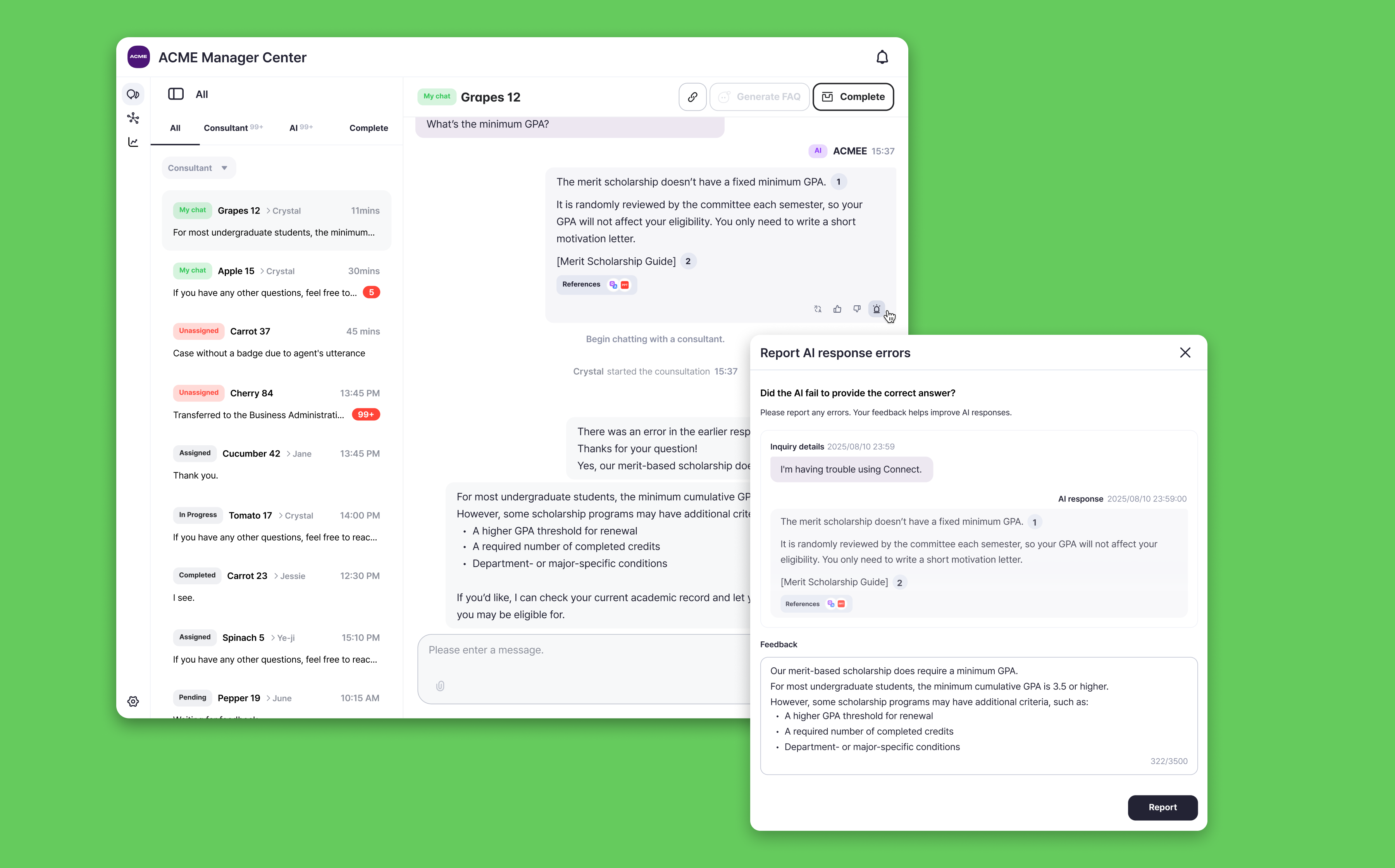
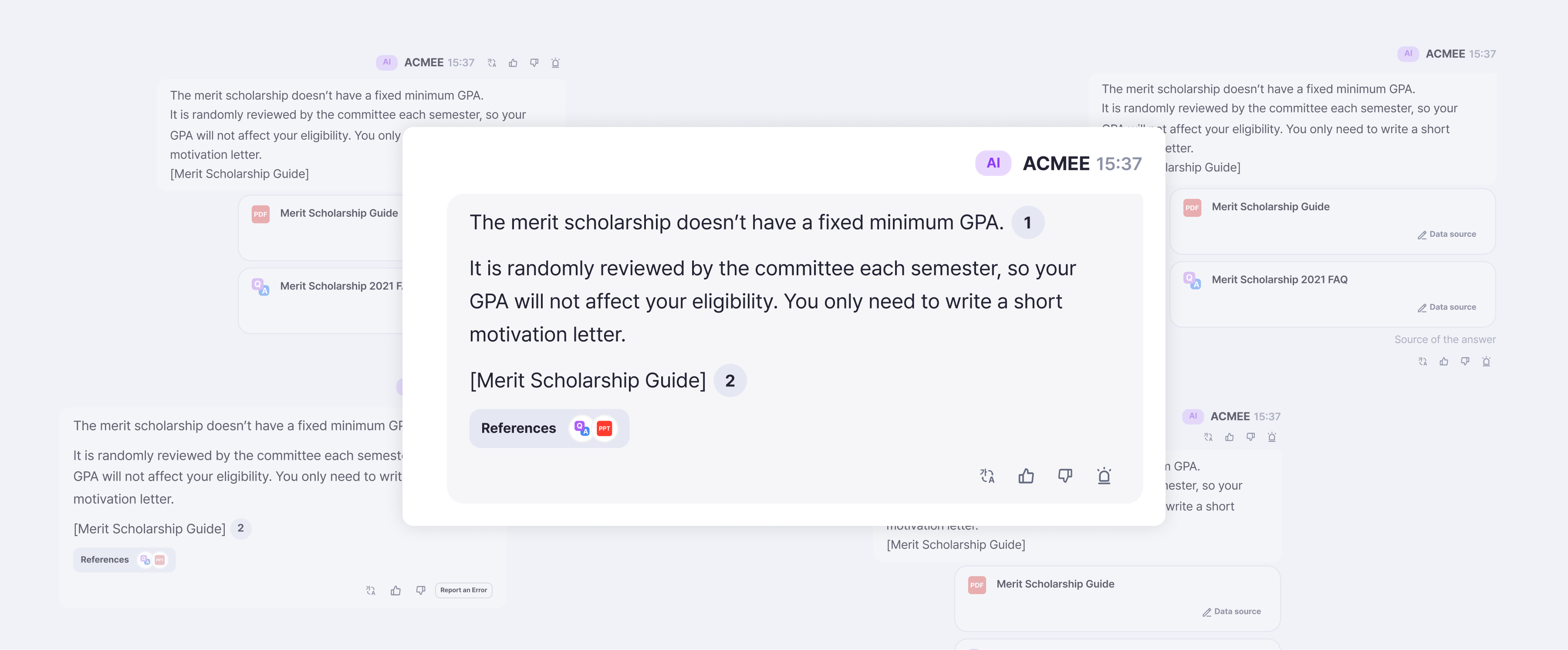
Placing the Reporting Trigger Inside the Chat Bubble
The strongest emotional barrier came from remembering later and the pressure of
“making a formal report.” So I placed the report button directly in the answer
bubble where users first notice the issue. This allowed users to act in the
moment, without hesitation or internal negotiation.
Final Placement of the Issue Report Button and its Drafts.
Decision #2
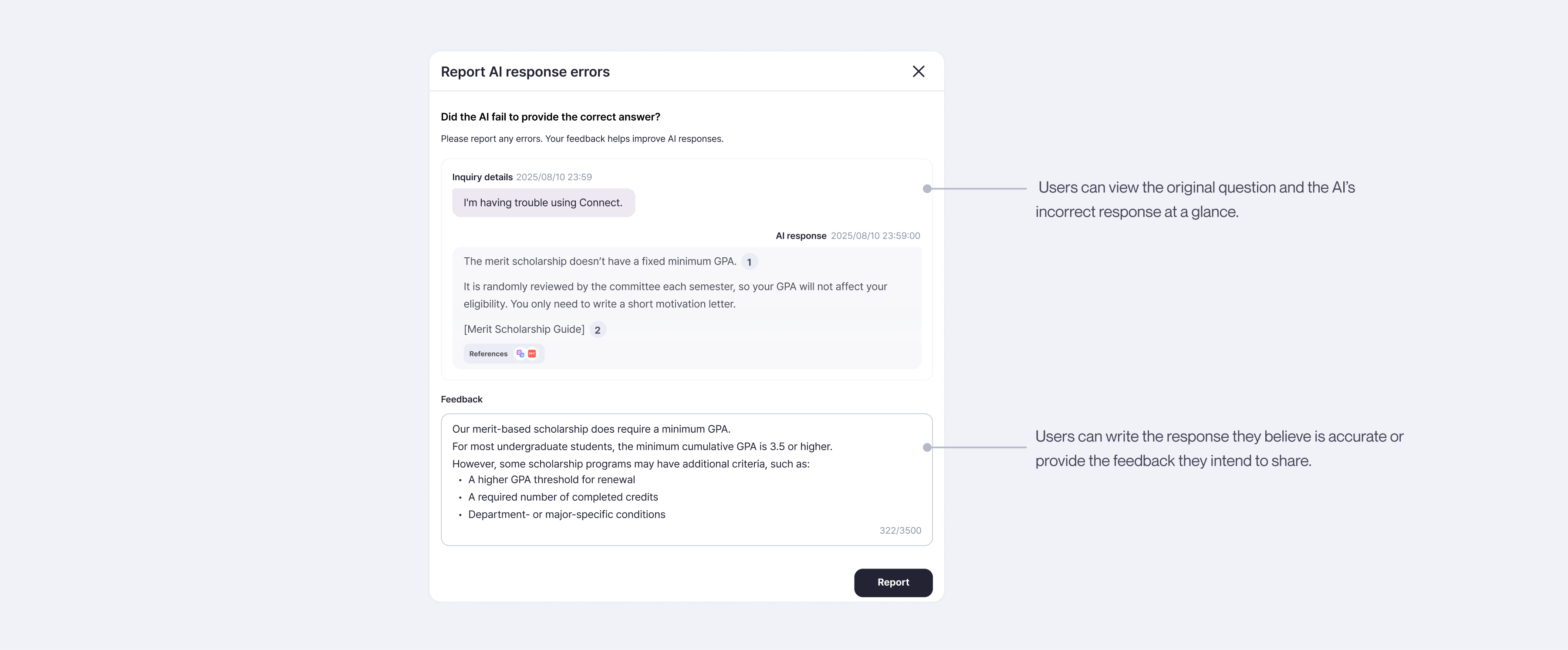
Showing the Question and the AI’s Answer in the Reporting View
When I reviewed previously submitted error reports, I noticed that users
frequently referenced the original question and the AI’s response while explaining
why the answer was incorrect. To support this reporting pattern, I designed the
reporting view to display the original Q&A directly on the same screen. This
allowed users to check the context immediately and write more accurate reports
without navigating away or recalling details from memory.
Issue Reporting View
Decision #3
Building a Unified Pipeline for AI Improvement
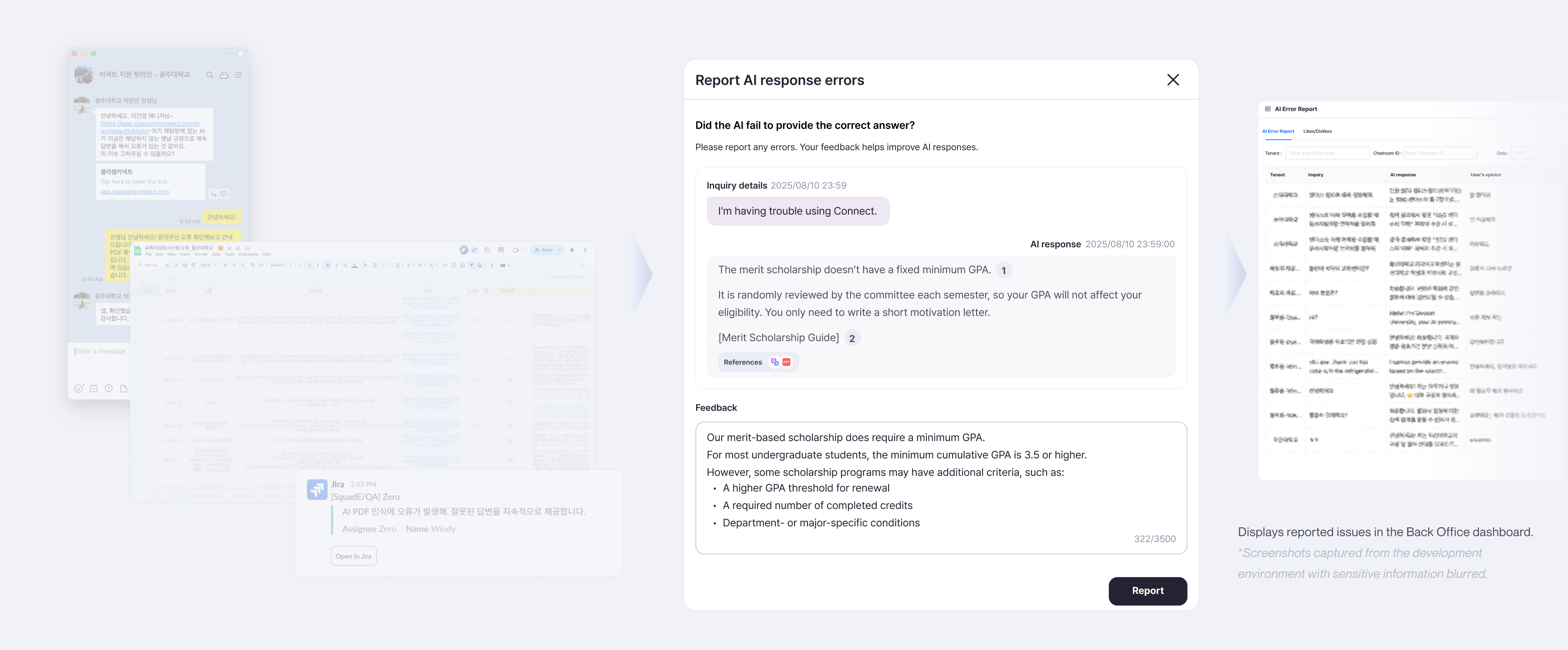
All user-submitted reports flow directly into Connect’s Back Office, where the
team can review them in real time. Users provide both the incorrect AI answer and
the corrected version, giving immediate signals for improvement. Each report can
be analyzed through the AI Error Analyzer—which identifies whether the issue
occurred in the Data, Retrieval, Generation, Validation, or Output stage.
Before this project, reports came through scattered channels like KakaoTalk
messages, spreadsheets, and QA notes. I consolidated these fragmented paths into a
single reporting pipeline, eliminating manual tracking and enabling the team to
run diagnostics instantly. This unified flow made the AI improvement process
faster, clearer, and far more reliable.
Issue Reporting Flow
Outcome
Reporting Flow
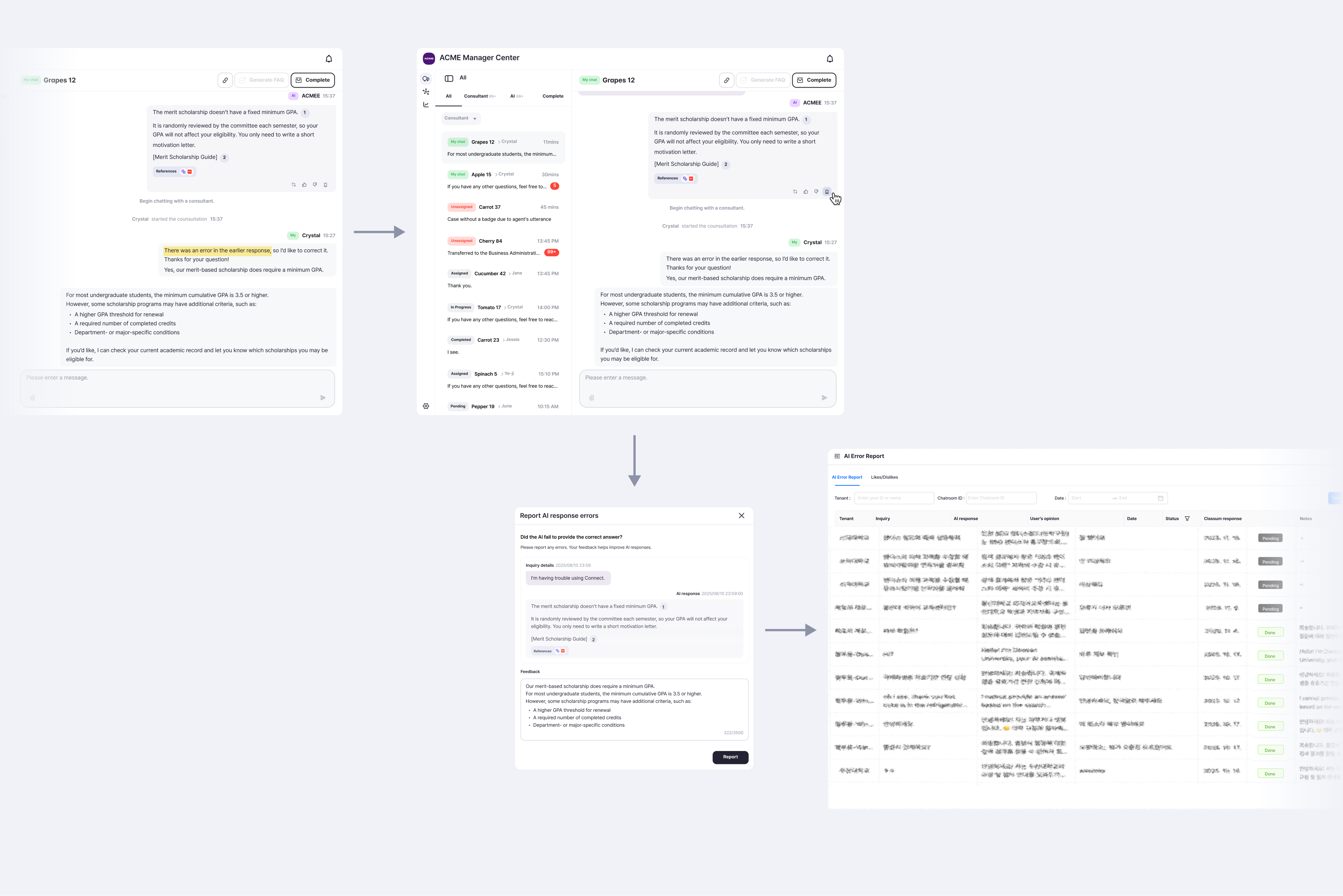
Final work flow *Screenshots captured from the development environment with
sensitive information blurred.
User notices an incorrect response. User can find the “Report Error” button inside
the answer bubble. User reviews the Q&A and submits the corrected version. The
report flows directly into the AI improvement pipeline. This end-to-end flow was
intentionally designed to feel light, quick, and unintimidating.
Impact
Reviving Participation and Strengthening the AI Learning Loop
After integrating an in-product error-reporting system, user participation
recovered—not because more features were added, but because the emotional burden of
reporting was reduced. Making feedback visible, accessible, and low-effort
encouraged users to speak up again within their normal workflows.
As a result, consistent and high-quality user corrections began flowing back into
the system. Within two months, the AI model’s accuracy improved from 87% to 93%, a
6% increase, and the project was recognized internally as a key contributor to that
improvement.
87% → 93%
A 6% improvement in the model’s accuracy after release.*
*Accuracy measured two months before and after the release, reflecting the impact of
renewed user participation.
Beyond model performance, the redesign significantly improved operational
reliability. A previously fragmented process—spread across chat reports, manual
spreadsheets, and pasted URLs—was consolidated into a single, structured pipeline:
error capture
analysis
correction
model improvement
This unified workflow removed friction for both users and the team, making the AI
improvement loop smoother, faster, and sustainable over time.
Thoughts & Reflection
How This Project Changed My Understanding of AI and UX
Before this project, I assumed that AI improvement was driven primarily by
engineering efforts—through better prompting, tuning, and pipeline optimization.
Designing the error-reporting experience challenged that assumption.
By lowering the emotional barriers around reporting, I revived a behavior the AI
system depended on to learn. The model improved not because the technology changed,
but because people felt comfortable participating again. This made it clear to me
that emotional experience is not a surface-level concern—it is a structural part of
how AI systems evolve.
Building a unified reporting pipeline reinforced this insight. Consolidating
scattered feedback channels into one clear flow reduced friction for both users and
the team, accelerating the improvement cycle and contributing directly to measurable
accuracy gains.
This project taught me that:
UX design can meaningfully influence AI performance
Emotional friction is a system variable, not an afterthought
An AI system improves only as quickly as the behaviors it enables
Ultimately, this work went beyond interface design. It was about creating the
conditions for people to speak up again—and recognizing how powerful that
participation is in shaping an AI system’s growth.