As Korean universities expanded support for international students,
Connect expanded to support multilingual institutions. Language became a
central part of the product experience. What initially appeared to be a translation
challenge quickly revealed deeper issues around consistency, credibility, and system
structure.
This project focused on how language functions across an AI-supported product—and
how design can preserve meaning as systems scale across languages.
Recorded the latest production version
Context
Connect supports institutional communication through a mix of AI-generated
responses and human intervention. As new clients required multilingual support, the
team initially relied on AI translation to extend existing functionality.
On the surface, the service appeared to operate in a single language. Underneath,
however, language behaved differently across multiple layers of the system:
AI chatbot responses that dynamically translated content
Human interventions that required live translation
System UI language managed through i18n
Client-authored responses stored as structured knowledge
Each layer followed different rules. As a result, inconsistencies began to
surface—affecting clarity, accuracy, and user trust.
Problem & Design Focus
The initial assumption was that translation quality was the primary concern. In
practice, the issue was not individual translations, but how language was structured
and coordinated across the system.
Because each component handled language differently, meaning could shift between AI
responses, human replies, and stored knowledge. Users experienced this as
inconsistency, even when translations were technically correct.
What began as a localization task became a system-level design problem—one that
directly affected scalability.
#
Language Experience Layers
As-is
To-be
1
AI ↔️ Inquirer
AI detects the user’s language and responds accordingly
No separate setting required
2
Consultant ↔️ Inquirer
Automatic translation when languages differ
Requires tenant’s default + supported language, end-user language settings
3
UI Language
Interface text visible to users
Managed through i18n system* to reduce maintenance and ensure consistency
4
Glossary
Tenant-defined phrases and term per language
Manual configuration supported by AI translation assistance
Language Experience Layers
*i18n (internationalization): a system that manages multilingual text consistently
across user interfaces.
Design Direction
The design shifted from treating translation as an isolated feature to building a
foundational language structure. Working closely with an engineer, I helped define
shared logic that aligned:
Default language behaviors
AI-generated responses and human-authored content
System UI language and client-managed knowledge
This included designing verification and glossary workflows that allowed
institutions to manage meaning intentionally, rather than relying solely on
automated translation. The collaboration required balancing conceptual clarity with
technical constraints, ensuring the system was both scalable and maintainable.
Design Process
Step-by-Step: Building a Multilingual Language System
1. System Framework
1-1. Defining the Default Language Logic
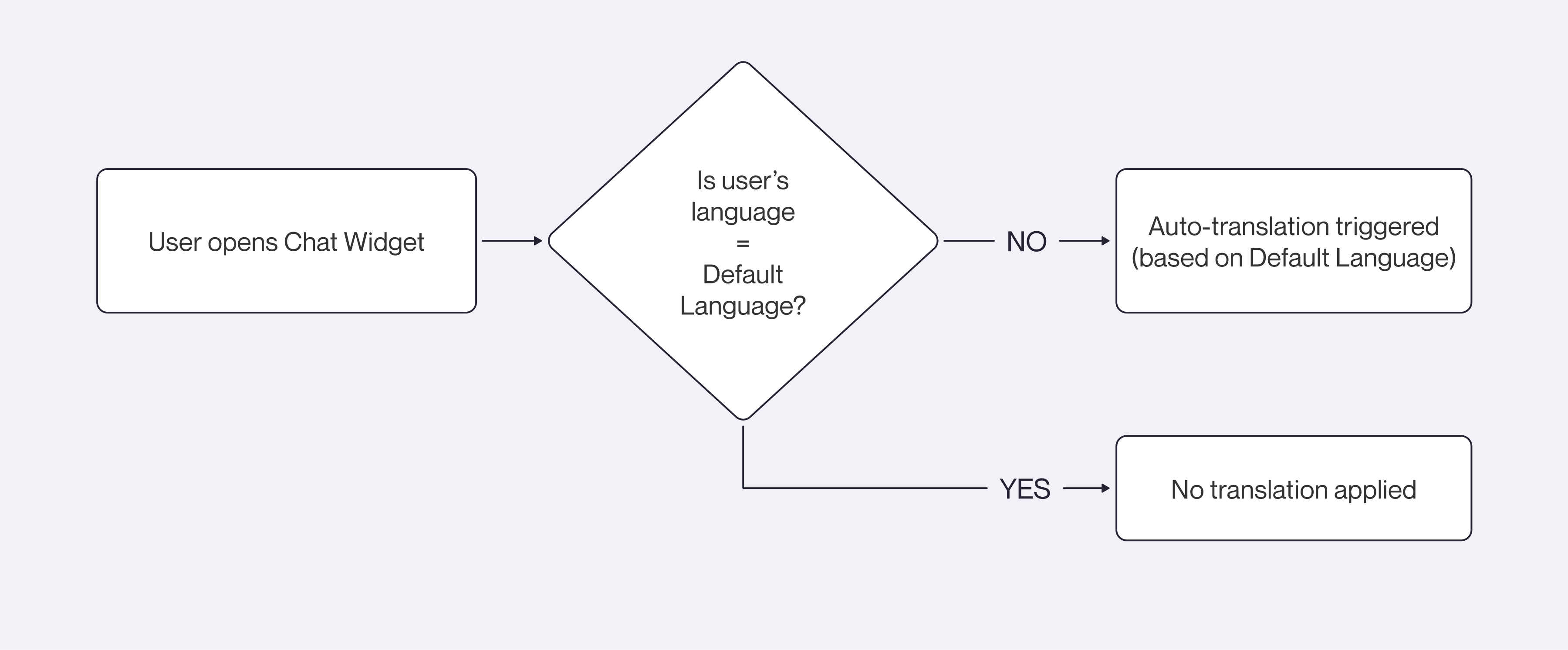
At the system level, I introduced the concept of a Default Language within the
back-office structure. This language serves as a reference index for all
translation processes—determining when automatic translation should be triggered
based on whether the end-user’s language in the Chat Widget matches the system’s
default language or not.
Ultimately, defining a clear default-language reference created a stable baseline
that reduces translation errors and provides a reliable point of verification
whenever language settings are applied.
Default Language Detection and Auto-Translation Flow
2-2. Applying the i18n System for UI Consistency
For all user-facing areas—including the Manager Center and Chat Widget—I applied
an i18n system to keep UI text consistent across the service. The goal was to
ensure that users always encounter the same wording, tone, and terminology,
avoiding confusion caused by inconsistent phrasing.
For example, an action like edit should never appear as “Edit” in one place and
“Modify” or “Revise” elsewhere. By centralizing all interface language, I created
a unified vocabulary and writing style that remained stable even when new
languages were added. Using i18n also prevented translation drift by ensuring the
system reused a consistent language structure rather than generating ad-hoc
translations. This approach reduced maintenance effort, improved scalability, and
kept the overall user experience coherent.
Glossary & Translation Verification Experience
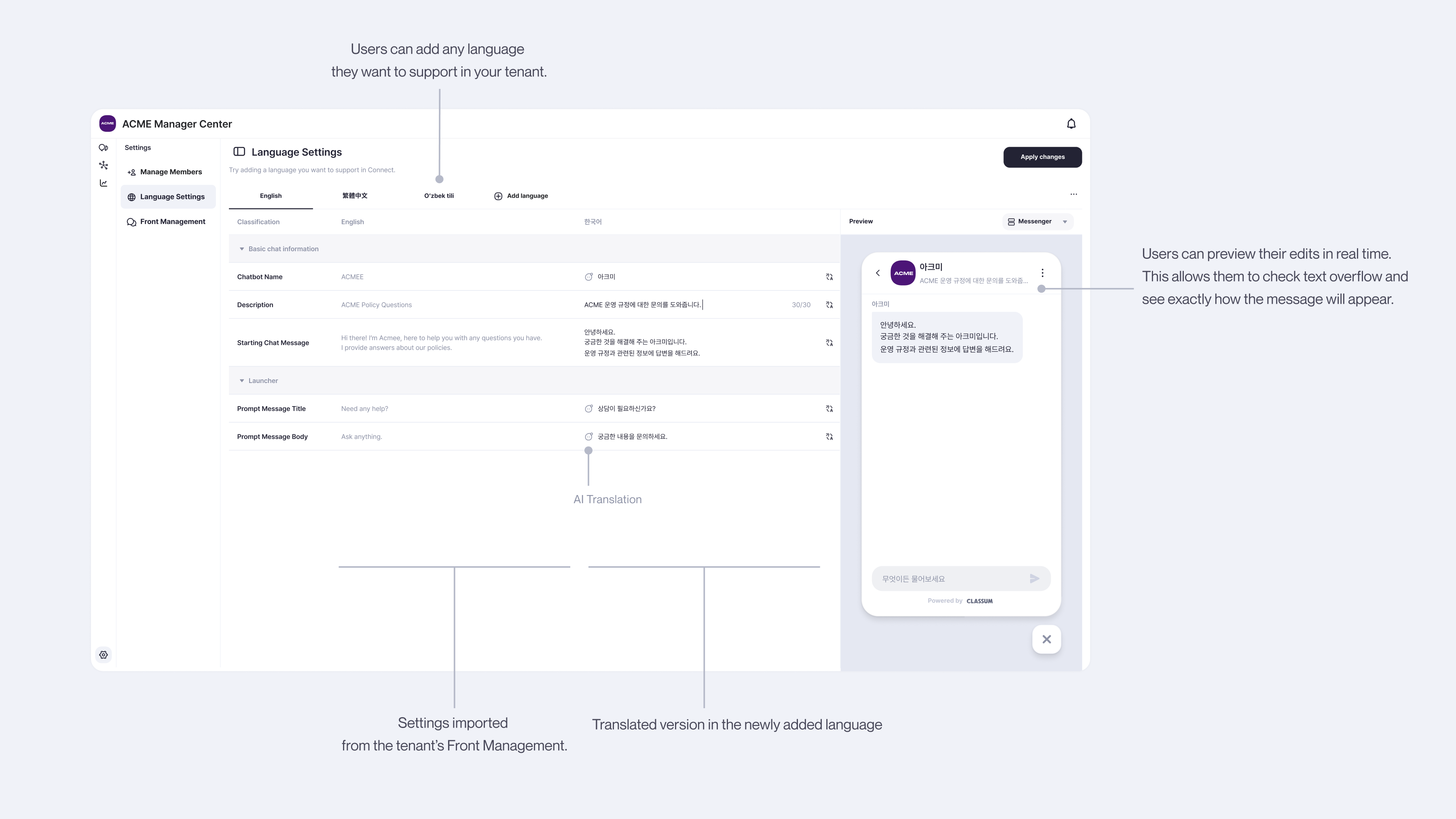
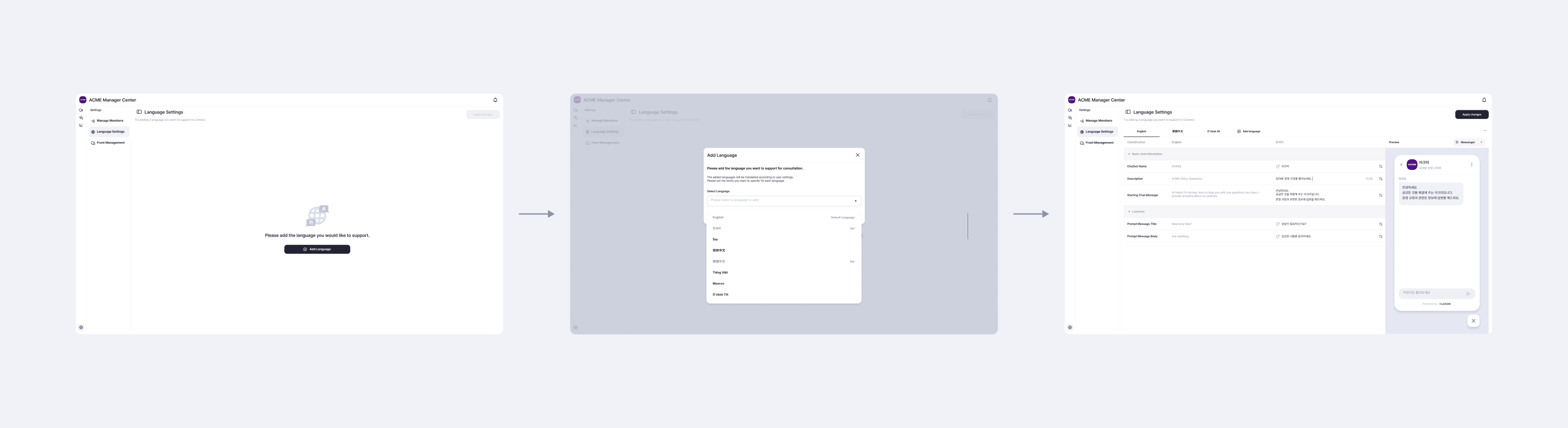
I designed a unified workflow that allows administrators to manage school-specific
terms and verify translations with confidence. When a new language is added, the
system generates an AI-based translation and displays it alongside the original
text. Administrators can compare both versions in real time, make edits as needed,
and instantly preview how the revised text will appear in the interface.
This combined flow supports:
Side-by-side comparison of AI translation and original text
Real-time preview to confirm differences in word length, tone, and overall
layout
Persistent storage of user-defined glossary terms, saved as tenant-specific keys
and reused across the service
Direct editing and ongoing management of terminology to match the institution’s
preferred tone and style
This unified tool ensures that translated content stays accurate, visually
coherent, and aligned with each school’s identity.
Language Settings PageAdd Language and Translation Verification Flow
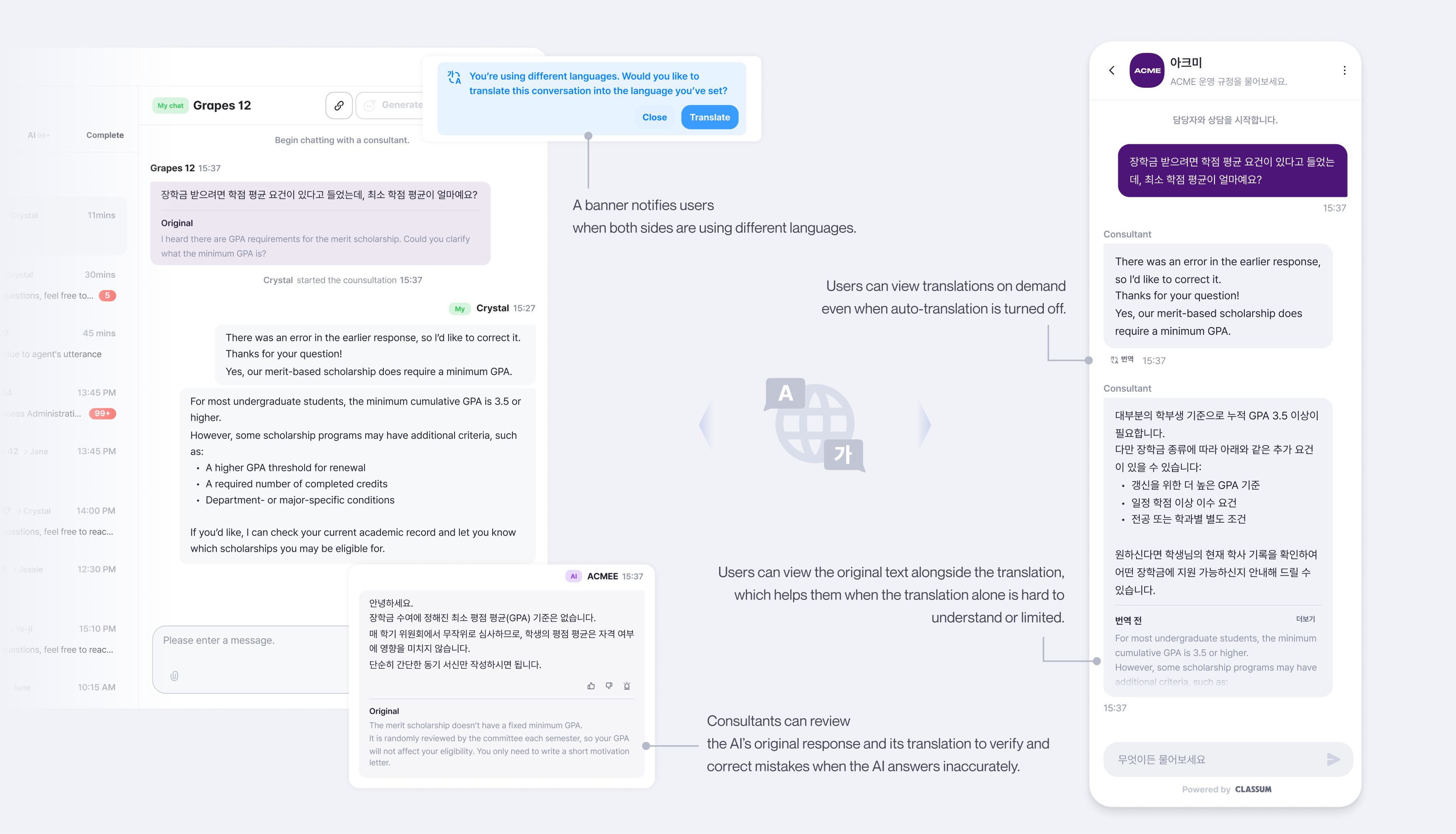
Conversation Experience
In the chat interface so that users can view the original message alongside its
translated version at any time. This allows both inquirers and consultants to
verify what was actually written and reduce misunderstandings that may occur
through automatic translation.
Because AI-generated translations can occasionally introduce errors or subtle
shifts in meaning, I made it possible for users to check the original text
directly within the conversation. This helps them confirm intent, understand
nuances, and quickly identify inaccuracies without breaking the interaction flow.
Through this approach, multilingual conversations become not only functional, but
safer, more reliable, and more resilient to AI translation errors, especially in
academic or administrative contexts where precision matters.
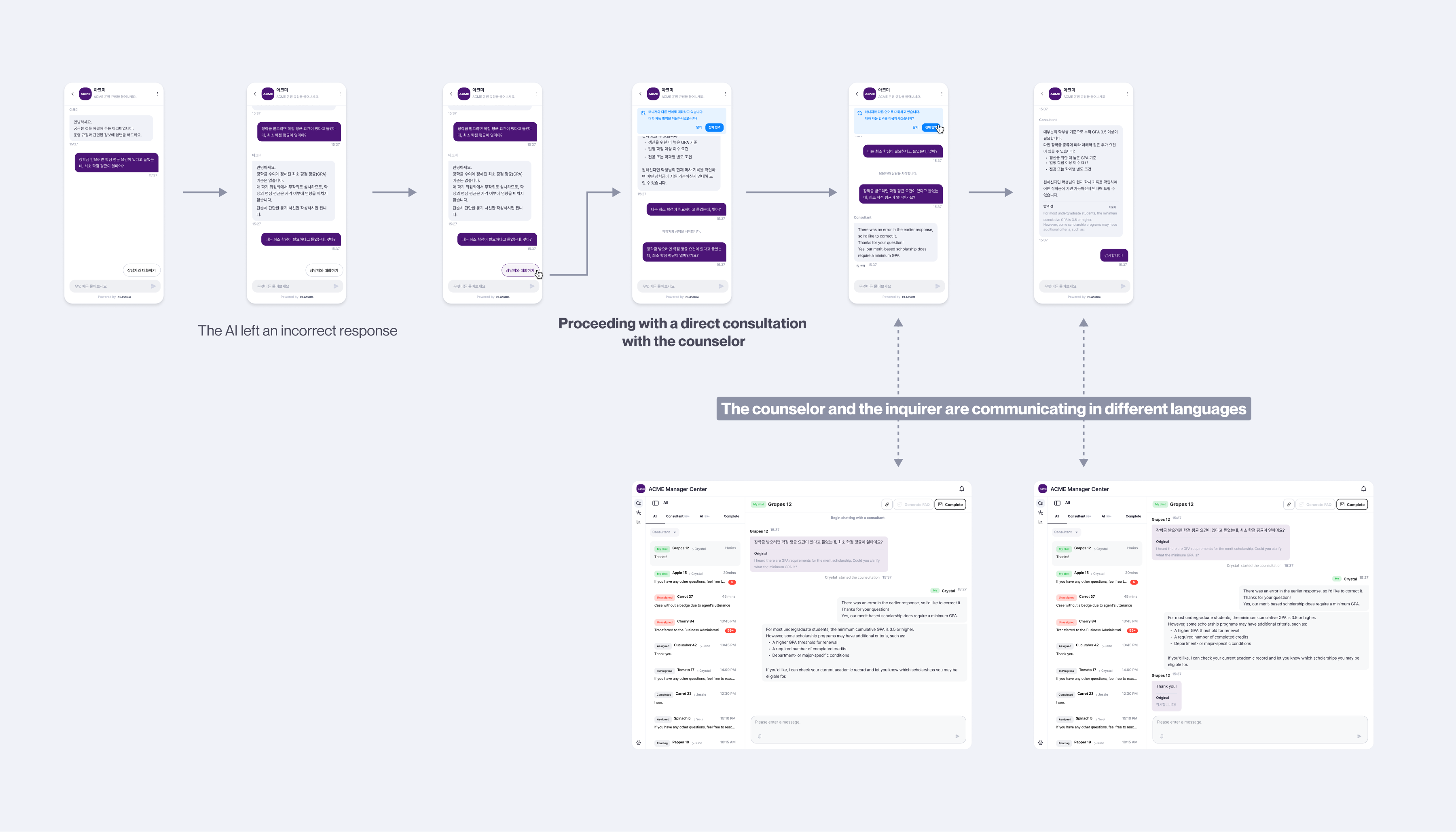
The chat interface for communicating through the translation feature in the Chat
widget and Inbox.
Outcome
Final Output: Unified Multilingual Communication Experience
Final Output
Administrators can set a default language, add supported languages, and refine
school-specific terminology through real-time comparison and preview. All glossary
inputs are stored as tenant-specific language keys, ensuring consistent and reusable
multilingual operation.
End-users can ask questions in their preferred language as set in the Chat Widget,
and view both the translated message and the original text to avoid AI-related
misinterpretation. Together, these flows create a unified multilingual experience
that supports accurate communication and reliable translation across the service.
Outcome
By designing language as infrastructure rather than surface-level translation,
Connect gained a scalable foundation for multilingual expansion. The new framework
allowed additional languages to be supported without reworking core workflows or
introducing inconsistencies across AI responses, human intervention, and system UI.
Instead of patching translations case by case, the product could extend to new
institutions and regions with significantly less overhead. Beyond technical
scalability, the multilingual system delivered clear business impact. The feature
was delivered on schedule in alignment with client contract requirements,
strengthening product reliability and maintaining trust with university partners.
Multilingual support also became a key differentiator during new university sales,
influencing how the product was positioned in proposals and supporting continued
growth.
Thoughts & Reflection
What I Learned as a Designer
Understanding Language as a System
Through building the multilingual framework from the ground up, I developed a
deeper technical understanding of how language systems operate—designing
consistent language logic, considering fallback and error scenarios, and improving
efficiency by reusing shared UI language across the product. Working closely with
an engineer strengthened my ability to design within technical constraints and
align design decisions with underlying architecture.
Growing as a B2B Designer
The experience also shaped how I think about B2B design. While the primary users
were university administrators, the success of the system ultimately depended on
international students and counselors who interacted with it daily. Designing for
clarity and trust across language barriers reinforced that even in B2B products,
long-term value is determined by the quality of everyday user experiences.